说明
家里 PVE 服务器创建的 Centos7 虚拟机由于当时创建的时候只选了 20G,并且采用了 UEFI 引导,结果这段时间容量快满了,不想加另外一盘通过挂载来搞,所以就基于原盘进行扩容。
要求
增加 10G 将原来的 20G 扩容成 30G
实施
后台磁盘扩容
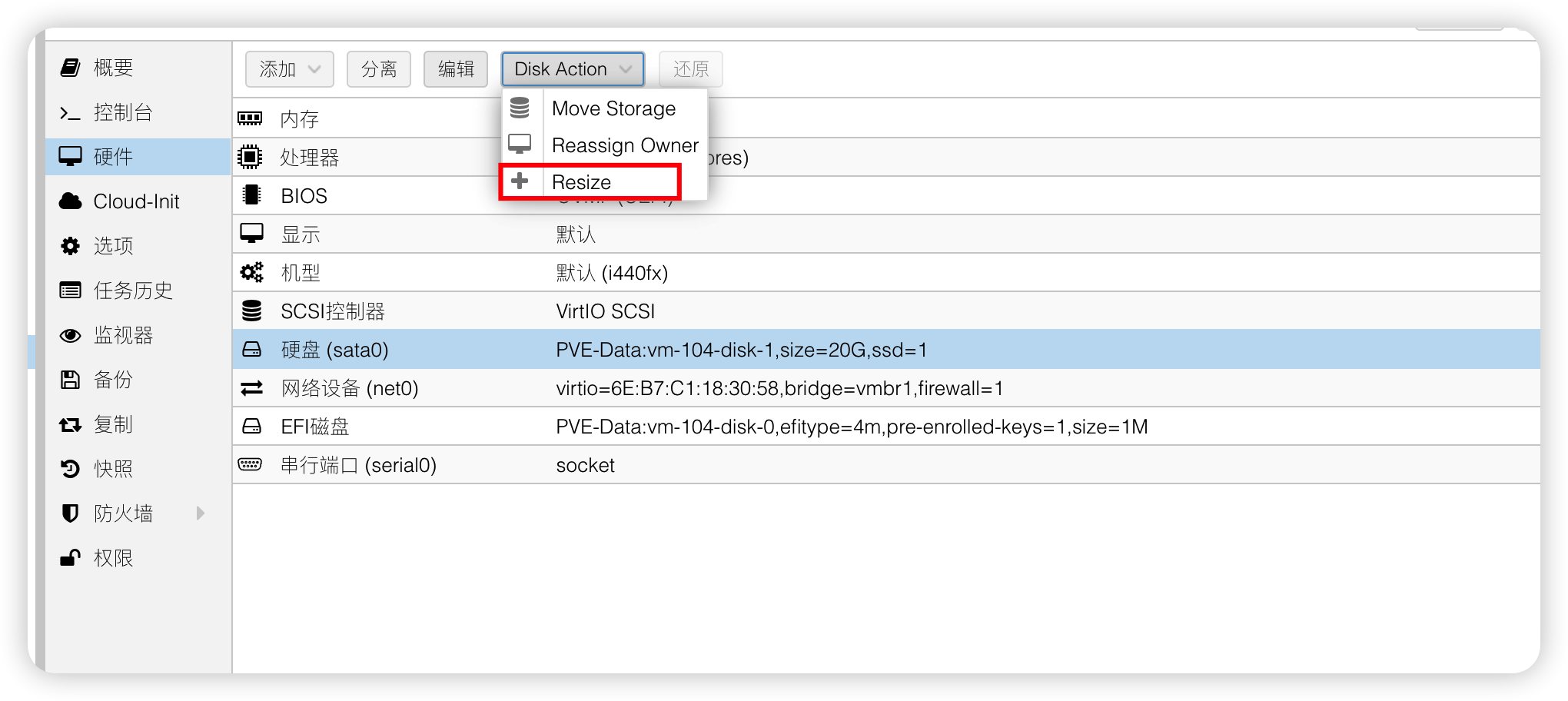
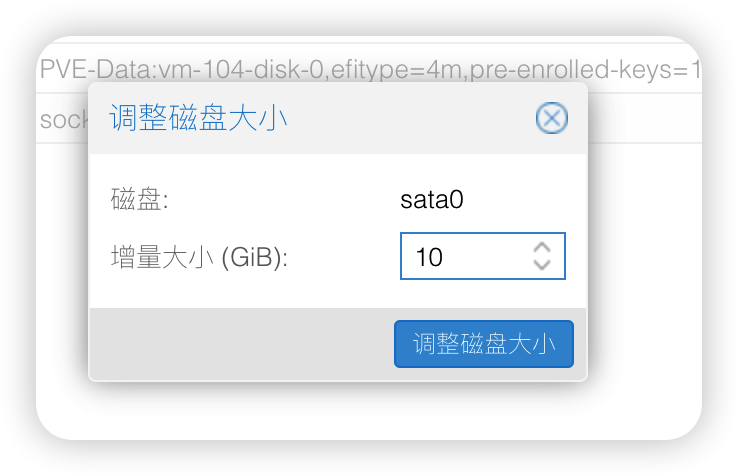
查看扩容后磁盘大小 以及 分区类型
[root@drone-runner-exec ~]# gdisk -l /dev/sda
GPT fdisk (gdisk) version 0.8.10

Partition table scan:
  MBR: protective
  BSD: not present
  APM: not present
  GPT: present

Found valid GPT with protective MBR; using GPT.
Disk /dev/sda: 62914560 sectors, 30.0 GiB
Logical sector size: 512 bytes
Disk identifier (GUID): E8568926-5BBE-49AB-82E8-24044A0B914E
Partition table holds up to 128 entries
First usable sector is 34, last usable sector is 41943006
Partitions will be aligned on 2048-sector boundaries
Total free space is 2014 sectors (1007.0 KiB)

Number  Start (sector)    End (sector)  Size       Code  Name
   1            2048          411647   200.0 MiB   EF00  EFI System Partition
   2          411648         2508799   1024.0 MiB  0700
   3         2508800        20969471   8.8 GiB     8E00
   4        20969472        41943006   10.0 GiB    8E00  Linux LVM
扩容
将扩容部分创建为新分区并设置为 8E00 分区类型
由于原来创建分区容量有一点未使用空间,现先将的未使用空间创建一个新分区
[root@drone-runner-exec ~]# gdisk /dev/sda
GPT fdisk (gdisk) version 0.8.10

Partition table scan:
  MBR: protective
  BSD: not present
  APM: not present
  GPT: present

Found valid GPT with protective MBR; using GPT.

Command (? for help): p
Disk /dev/sda: 62914560 sectors, 30.0 GiB
Logical sector size: 512 bytes
Disk identifier (GUID): E8568926-5BBE-49AB-82E8-24044A0B914E
Partition table holds up to 128 entries
First usable sector is 34, last usable sector is 41943006
Partitions will be aligned on 2048-sector boundaries
Total free space is 2014 sectors (1007.0 KiB)

Number  Start (sector)    End (sector)  Size       Code  Name
   1            2048          411647   200.0 MiB   EF00  EFI System Partition
   2          411648         2508799   1024.0 MiB  0700
   3         2508800        20969471   8.8 GiB     8E00
   4        20969472        41943006   10.0 GiB    8E00  Linux LVM

Command (? for help): n
Partition number (5-128, default 5):
First sector (34-2047, default = 34) or {+-}size{KMGTP}:
Last sector (34-2047, default = 2047) or {+-}size{KMGTP}:
Current type is 'Linux filesystem'
Hex code or GUID (L to show codes, Enter = 8300): 8e00
Changed type of partition to 'Linux LVM'

Command (? for help): w
Warning! Secondary header is placed too early on the disk! Do you want to
correct this problem? (Y/N): y
Have moved second header and partition table to correct location.

Final checks complete. About to write GPT data. THIS WILL OVERWRITE EXISTING
PARTITIONS!!

Do you want to proceed? (Y/N): y
OK; writing new GUID partition table (GPT) to /dev/sda.
Warning: The kernel is still using the old partition table.
The new table will be used at the next reboot.
The operation has completed successfully.
删掉上面新建的分区,让其合并进扩容容量中,在进行扩容部分的新分区创建
[root@drone-runner-exec ~]# gdisk /dev/sda
GPT fdisk (gdisk) version 0.8.10

Partition table scan:
  MBR: protective
  BSD: not present
  APM: not present
  GPT: present

Found valid GPT with protective MBR; using GPT.

Command (? for help): p
Disk /dev/sda: 62914560 sectors, 30.0 GiB
Logical sector size: 512 bytes
Disk identifier (GUID): E8568926-5BBE-49AB-82E8-24044A0B914E
Partition table holds up to 128 entries
First usable sector is 34, last usable sector is 62914526
Partitions will be aligned on 2-sector boundaries
Total free space is 20971520 sectors (10.0 GiB)

Number  Start (sector)    End (sector)  Size       Code  Name
   1            2048          411647   200.0 MiB   EF00  EFI System Partition
   2          411648         2508799   1024.0 MiB  0700
   3         2508800        20969471   8.8 GiB     8E00
   4        20969472        41943006   10.0 GiB    8E00  Linux LVM
   5              34            2047   1007.0 KiB  8E00  Linux LVM

Command (? for help): d
Partition number (1-5): 5

Command (? for help): p
Disk /dev/sda: 62914560 sectors, 30.0 GiB
Logical sector size: 512 bytes
Disk identifier (GUID): E8568926-5BBE-49AB-82E8-24044A0B914E
Partition table holds up to 128 entries
First usable sector is 34, last usable sector is 62914526
Partitions will be aligned on 2-sector boundaries
Total free space is 20973534 sectors (10.0 GiB)

Number  Start (sector)    End (sector)  Size       Code  Name
   1            2048          411647   200.0 MiB   EF00  EFI System Partition
   2          411648         2508799   1024.0 MiB  0700
   3         2508800        20969471   8.8 GiB     8E00
   4        20969472        41943006   10.0 GiB    8E00  Linux LVM

Command (? for help): n
Partition number (5-128, default 5):
First sector (34-62914526, default = 41943008) or {+-}size{KMGTP}:
Last sector (41943008-62914526, default = 62914526) or {+-}size{KMGTP}:
Current type is 'Linux filesystem'
Hex code or GUID (L to show codes, Enter = 8300): 8e00
Changed type of partition to 'Linux LVM'

Command (? for help): p
Disk /dev/sda: 62914560 sectors, 30.0 GiB
Logical sector size: 512 bytes
Disk identifier (GUID): E8568926-5BBE-49AB-82E8-24044A0B914E
Partition table holds up to 128 entries
First usable sector is 34, last usable sector is 62914526
Partitions will be aligned on 2-sector boundaries
Total free space is 2015 sectors (1007.5 KiB)

Number  Start (sector)    End (sector)  Size       Code  Name
   1            2048          411647   200.0 MiB   EF00  EFI System Partition
   2          411648         2508799   1024.0 MiB  0700
   3         2508800        20969471   8.8 GiB     8E00
   4        20969472        41943006   10.0 GiB    8E00  Linux LVM
   5        41943008        62914526   10.0 GiB    8E00  Linux LVM

Command (? for help): w

Final checks complete. About to write GPT data. THIS WILL OVERWRITE EXISTING
PARTITIONS!!

Do you want to proceed? (Y/N): y
OK; writing new GUID partition table (GPT) to /dev/sda.
Warning: The kernel is still using the old partition table.
The new table will be used at the next reboot.
The operation has completed successfully.
显示设备和分区的概要信息
[root@drone-runner-exec ~]# partprobe -s
/dev/sda: gpt partitions 1 2 3 4 5
显示现在可用块设备的信息
[root@drone-runner-exec ~]# lsblk
NAME                             MAJ:MIN RM  SIZE RO TYPE MOUNTPOINT
sda                                8:0    0   30G  0 disk
├─sda1                             8:1    0  200M  0 part /boot/efi
├─sda2                             8:2    0    1G  0 part /boot
├─sda3                             8:3    0  8.8G  0 part
│ ├─centos_centos--template-root 253:0    0 17.8G  0 lvm  /
│ └─centos_centos--template-swap 253:1    0    1G  0 lvm  [SWAP]
├─sda4                             8:4    0   10G  0 part
│ └─centos_centos--template-root 253:0    0 17.8G  0 lvm  /
└─sda5                             8:5    0   10G  0 part
显示现在物理卷
root@drone-runner-exec ~]# pvdisplay
  --- Physical volume ---
  PV Name               /dev/sda3
  VG Name               centos_centos-template
  PV Size               8.80 GiB / not usable 2.00 MiB
  Allocatable           yes (but full)
  PE Size               4.00 MiB
  Total PE              2253
  Free PE               0
  Allocated PE          2253
  PV UUID               QltmTV-hBoU-pASF-ioB9-llMd-AVgD-o766Qw

  --- Physical volume ---
  PV Name               /dev/sda4
  VG Name               centos_centos-template
  PV Size               10.00 GiB / not usable 4.98 MiB
  Allocatable           yes (but full)
  PE Size               4.00 MiB
  Total PE              2559
  Free PE               0
  Allocated PE          2559
  PV UUID               IBn2Rz-RURW-jrbM-Ijik-LXK5-73uj-5czCPv
将新建分区初始化为物理卷
[root@drone-runner-exec ~]# pvcreate /dev/sda5
  Physical volume "/dev/sda5" successfully created.
显示当前最新物理卷
[root@drone-runner-exec ~]# pvdisplay
  --- Physical volume ---
  PV Name               /dev/sda3
  VG Name               centos_centos-template
  PV Size               8.80 GiB / not usable 2.00 MiB
  Allocatable           yes (but full)
  PE Size               4.00 MiB
  Total PE              2253
  Free PE               0
  Allocated PE          2253
  PV UUID               QltmTV-hBoU-pASF-ioB9-llMd-AVgD-o766Qw

  --- Physical volume ---
  PV Name               /dev/sda4
  VG Name               centos_centos-template
  PV Size               10.00 GiB / not usable 4.98 MiB
  Allocatable           yes (but full)
  PE Size               4.00 MiB
  Total PE              2559
  Free PE               0
  Allocated PE          2559
  PV UUID               IBn2Rz-RURW-jrbM-Ijik-LXK5-73uj-5czCPv

  "/dev/sda5" is a new physical volume of "<10.00 GiB"
  --- NEW Physical volume ---
  PV Name               /dev/sda5
  VG Name
  PV Size               <10.00 GiB
  Allocatable           NO
  PE Size               0
  Total PE              0
  Free PE               0
  Allocated PE          0
  PV UUID               dwGjV0-M3JC-vczv-pM25-qyH5-5pgo-BbtVGf
显示现有 LVM 卷组的信息
[root@drone-runner-exec ~]# vgdisplay
  --- Volume group ---
  VG Name               centos_centos-template
  System ID
  Format                lvm2
  Metadata Areas        2
  Metadata Sequence No  5
  VG Access             read/write
  VG Status             resizable
  MAX LV                0
  Cur LV                2
  Open LV               2
  Max PV                0
  Cur PV                2
  Act PV                2
  VG Size               <18.80 GiB
  PE Size               4.00 MiB
  Total PE              4812
  Alloc PE / Size       4812 / <18.80 GiB
  Free  PE / Size       0 / 0
  VG UUID               JagpPX-SGkz-UurK-7pJH-UxZD-HFTh-7invRM
向 LVM 卷组中添加物理卷
[root@drone-runner-exec ~]# vgextend centos_centos-template /dev/sda5
  Volume group "centos_centos-template" successfully extended
调整 LVM 卷组中逻辑卷的空间大小
[root@drone-runner-exec ~]# lvresize -l +100%FREE /dev/centos_centos-template/root
  Size of logical volume centos_centos-template/root changed from <17.80 GiB (4556 extents) to 27.79 GiB (7115 extents).
  Logical volume centos_centos-template/root successfully resized.
更新文件系统信息
[root@drone-runner-exec ~]# xfs_growfs /
meta-data=/dev/mapper/centos_centos--template-root isize=512    agcount=10, agsize=511232 blks
         =                       sectsz=512   attr=2, projid32bit=1
         =                       crc=1        finobt=0 spinodes=0
data     =                       bsize=4096   blocks=4665344, imaxpct=25
         =                       sunit=0      swidth=0 blks
naming   =version 2              bsize=4096   ascii-ci=0 ftype=1
log      =internal               bsize=4096   blocks=2560, version=2
         =                       sectsz=512   sunit=0 blks, lazy-count=1
realtime =none                   extsz=4096   blocks=0, rtextents=0
data blocks changed from 4665344 to 7285760
验证扩容成功
[root@drone-runner-exec ~]# df -lh
文件系统                                  容量  已用  可用 已用% 挂载点
devtmpfs                                  1.9G     0  1.9G    0% /dev
tmpfs                                     1.9G     0  1.9G    0% /dev/shm
tmpfs                                     1.9G  8.6M  1.9G    1% /run
tmpfs                                     1.9G     0  1.9G    0% /sys/fs/cgroup
/dev/mapper/centos_centos--template-root   28G  2.1G   26G    8% /
/dev/sda2                                1014M  187M  828M   19% /boot
/dev/sda1                                 200M   12M  189M    6% /boot/efi
tmpfs                                     379M     0  379M    0% /run/user/0